
Liene Photo
Hannto TechnologyPhotography
3.9237.00 Reviews
- Version
- 2.5.730
- Installs
- 100.00K
- Age Rating
- Everyone
Screenshots

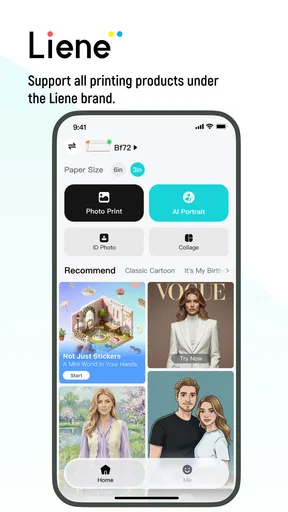
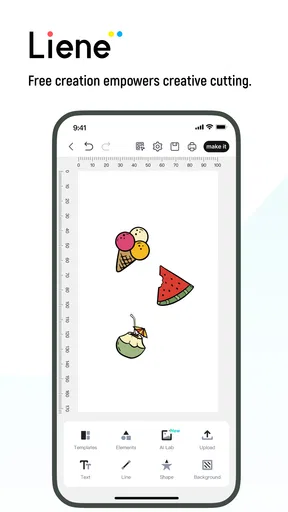
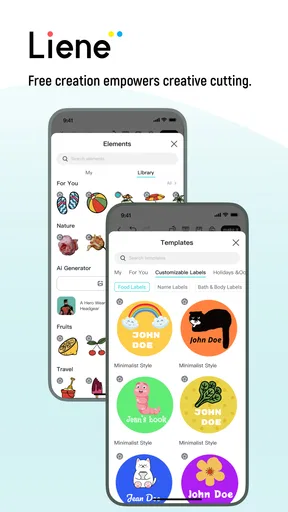
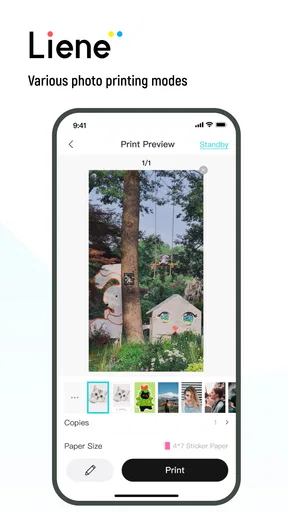

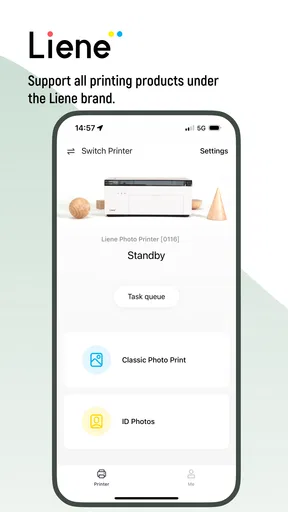
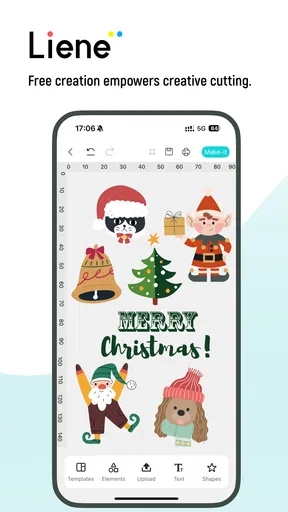
Our Review of Liene Photo
 Analysis by Appyee
I approached Liene Photo as a practical photography app rather than expecting it to replace a full camera suite. That distinction matters. Its store summary, “Let Inspiration Enrich New Era,” is broad, while the short description simply identifies it as Liene Photo. In daily use, I found the most useful way to judge it is by asking whether it makes small photo tasks easier, not whether it offers every editing tool available on Android.
The app comes from Hannto Technology and is free to use, with an Everyone content rating. It belongs to the photography category and has attracted over 100 thousand installs, alongside a 3.9 average from roughly 600 ratings. Those figures suggest a modest but established audience: enough people have tried it to reveal that it is not an obscure experiment, but not so many that I would treat popularity alone as proof of universal reliability.
My overall impression is cautiously positive. Liene Photo is worth considering if you want a focused companion for compatible photo workflows and prefer a straightforward mobile experience. It is less convincing for someone searching for a deep, all-purpose editor with advanced controls, extensive creative effects, or the broadest possible device support.
How Liene Photo feels during ordinary photo work
I find Liene Photo easiest to judge when I give it one clear job instead of treating it as another place to store my whole camera roll. For a first try, I’d choose a few non-essential pictures and note which steps feel simpler than using the phone’s gallery. That small comparison makes it easier to decide whether the app earns a regular place in my routine.
Speed expectations before you start
The first thing I would set clearly is the performance expectation. Liene Photo should be approached as a utility around photography, not as a heavyweight desktop replacement squeezed onto a phone. Simple actions should feel more comfortable than complicated projects involving many large images, and that makes the app a better fit for occasional printing or sharing tasks than for an intensive editing session.
On a reasonably modern Android phone, I would expect the opening and basic navigation to be manageable, but the experience can still depend on the device, the size of the images, and whatever work is happening around the app. A phone with limited free storage or memory may feel less responsive when handling several high-resolution pictures. That is not a reason to dismiss the app; it is a reminder to keep the workflow focused.
The current version is 2.5.730, and it supports Android 7.0 or later. That compatibility range is useful for people keeping an older phone in service, although an older operating system does not automatically mean the experience will be identical to that on a newer handset. Hardware age, available storage, and camera file size can matter just as much as the operating system number.
I would also avoid judging the app solely by the first launch. Photography tools often feel fastest when the phone has room to work and the user starts with a small, clearly selected batch. If you open it while many other apps are active, switch repeatedly between large images, and keep storage nearly full, the phone itself may become the limiting factor.
What happens during heavier use
The more demanding moment is not taking a single picture; it is building a workflow around multiple images. A realistic example is a weekend event where I return with a crowded camera roll, select several pictures, make basic adjustments, and prepare them for sharing or physical output. That is where organization becomes more important than flashy editing.
My advice is to work in short groups rather than throwing the entire camera roll into one session. I would first remove obvious duplicates and blurred shots in the phone’s normal gallery, then open Liene Photo with the images that actually need attention. This reduces clutter and makes it easier to notice whether a particular image is slowing down the process.
Large files can also expose the difference between a light photography utility and a full editor. If your routine involves raw files, layered compositions, detailed retouching, or repeated exports at maximum quality, you may quickly reach the point where a more specialized application is the sensible choice. Liene Photo is easier to recommend when the goal is a clean, direct result rather than a long chain of edits.
One useful habit is to finish one image completely before starting a large batch. That lets you check the crop, orientation, color appearance, and final output before repeating the same process. It can prevent the frustrating situation where a mistake is duplicated across many pictures. This is a small workflow improvement, but it is especially valuable on a phone where undoing a large batch may be less comfortable than correcting one image at a time.
Reliability in a normal day
Reliability is more than whether an app crashes. For a photography tool, I also care about whether it keeps the selected image clear, returns to the expected screen after an interruption, and makes the final result easy to locate. Liene Photo is most reassuring when used for a defined task with a manageable number of images. That narrow approach reduces the number of places where a mobile workflow can become confusing.
I would still protect important originals. Keep the original photographs in your normal gallery or another backup location before making substantial changes. This is good practice with any photo app, but it matters even more when you are testing a tool for the first time. If the result is not what you wanted, you can start again without losing the source image.
Another practical recovery habit is to save or finish an image before leaving the app for a phone call, message, or another application. Mobile operating systems can reclaim memory when several apps are open, particularly on older devices. A short, completed workflow is easier to recover than an unfinished project that has been left in the background for a long time.
If something feels stuck, I would first return to the home screen, reopen the app, and retry with one smaller image rather than immediately repeating the entire batch. Checking free storage and closing unrelated apps is also sensible. These steps do not guarantee a solution, but they make troubleshooting more controlled and help separate an app issue from a phone-resource issue.
Device limits that should shape your choice
The Android 7.0 minimum makes Liene Photo accessible to owners of older phones, which is a genuine advantage for people who do not upgrade frequently. At the same time, older compatibility should not be confused with identical performance across every supported device. A phone from the Android 7.0 era may have much less memory and slower storage than a recent model.
On an older handset, I would keep the workflow simple: choose only the photos needed for the current task, avoid leaving many other applications open, and make sure there is comfortable free storage before beginning. If the phone is already slow in its gallery, camera, or file manager, Liene Photo is unlikely to transform it into a fast editing workstation.
Device constraints also affect what kind of user will enjoy the app. Someone who wants to process a few family pictures on an older phone may appreciate the option to try a free photography app without buying new hardware. A creator who regularly handles large collections may find that the same phone is the real bottleneck, even if the app itself is stable enough for lighter work.
Storage planning is easy to overlook. Photos can occupy much more space than expected, especially when the camera saves high-resolution originals and the user keeps several exported copies. I recommend reviewing the phone’s storage before a trip or event, rather than discovering the problem after taking the pictures. Keeping originals and finished copies in clearly named folders also makes recovery less stressful.
Where it fits beside familiar alternatives
Most phones already include a gallery app with basic cropping, rotation, and sharing. If that is all you need, the built-in option may be faster because it is already part of the phone’s normal photo flow. You do not need Liene Photo simply to perform the most elementary action available in your gallery.
Dedicated editors are stronger when you want precise exposure control, masks, layers, extensive retouching, or a large creative toolkit. They are better suited to photographers who enjoy spending time refining an image. The trade-off is that these apps can feel heavier and more complicated for a quick, practical job.
That leaves Liene Photo in a useful middle position. It can appeal to someone who wants a photography-focused app without committing to a professional editing environment. I would choose it for a compact, repeatable process, while choosing a more advanced editor for serious image development and the built-in gallery for a one-tap correction.
The important comparison is not which app has the longest feature list. It is which tool creates the least friction for your actual routine. If you mostly take casual pictures and immediately share them, the phone’s default tools may be enough. If you want more control and do not mind a learning curve, a specialist editor is likely better. Liene Photo makes the most sense when you want something between those two extremes.
Three practical ways to get more from it
My first tip is to create a repeatable “select, check, finish” routine. Select only the images that have a clear purpose, check one result carefully, and finish the group only after the output looks right. This avoids wasting time on photos that were never worth editing and reduces the chance of repeating an unwanted adjustment.
My second tip is to separate personal photos from task-based work. For example, keep a small group for a birthday invitation, a marketplace listing, or a document-like snapshot instead of mixing those pictures with an entire holiday album. The smaller group makes it easier to judge whether Liene Photo is helping and keeps the app from becoming another crowded version of your gallery.
My third tip is to use the app as part of a recovery-friendly system. Preserve originals, complete exports in small stages, and confirm where the finished image appears before deleting anything. This is particularly helpful when moving between an older Android phone and another device, because it prevents an uncertain app session from becoming the only copy of an important picture.
A fourth insight is that “free” changes the trial decision, not the time cost. Since there is no purchase price to test it, I can reasonably try Liene Photo with a small set of non-critical images. But I would not immediately move an entire archive into a new workflow. A short trial reveals whether its navigation, output handling, and speed match your phone before you depend on it.
Who should use it, and who should skip it
I would recommend giving Liene Photo a chance if you want a free photography app, use Android, and prefer a focused process over a large professional toolbox. It may suit families preparing a small set of pictures, casual users who want a dedicated photo workflow, and owners of older compatible phones who need something more purposeful than the default gallery without demanding studio-level control.
I would be more hesitant to recommend it to professional photographers, social creators who need advanced retouching, or anyone whose work depends on highly repeatable color management and complex project files. Those users should look toward an established specialist editor with the controls and file-handling depth their work requires.
I would also skip it if your only need is an occasional crop or rotation. In that situation, the built-in gallery is probably more convenient. Installing another app adds another place to look for images and another workflow to remember, so Liene Photo needs to offer enough value for your particular routine to justify that extra step.
My performance verdict after weighing the trade-offs
Liene Photo is best understood as a practical, approachable photography option rather than a universal answer for every image task. Its free price, Everyone rating, and support for Android 7.0 or later make it easy to try across a broad range of phones. Hannto Technology has built an app with a clear enough purpose to attract a real user base, reflected in its roughly 600 ratings and more than 100 thousand installs.
The 3.9 average rating feels consistent with a product that can be useful while still leaving room for individual expectations and device differences. I would not promise identical speed or stability on every handset, particularly when storage is tight or the workload involves many large files. The safest approach is to begin with a small, non-essential photo group and judge the experience on your own phone.
For me, the deciding strength is the possibility of a focused workflow without the weight of a full professional editor. The deciding weakness is that users with demanding image collections may outgrow that focus. Choose Liene Photo for a simple, deliberate photography routine, not for advanced studio-style editing.
In the end, I would recommend trying Liene Photo if its focused approach matches the way you handle pictures and you want to test a free option before committing to something more complex. Keep backups, work in manageable groups, and compare it honestly with the gallery already on your phone. Used with those expectations, it can be a useful addition; used as a replacement for every photography tool, it is unlikely to be the right fit.
Verdict
Strengths of Liene Photo
- Simple tools make quick photo edits easy for beginners.
- Supports creative layouts for collages and photo compositions.
- Useful filters and effects add variety to everyday pictures.
- Convenient for preparing images for social media sharing.
- Lightweight design keeps the editing process straightforward.
Limitations of Liene Photo
- Some advanced editing controls may be missing for experienced users.
- Certain effects or templates may require in-app purchases.
- Export quality can vary depending on the selected editing options.
- The interface may feel limited compared with full photo editors.
- Ad interruptions can make longer editing sessions less convenient.
Similar Picks in This Category
View All
Google Photos
Google LLC4.4

Gallery
Google LLC4.2

Picsart AI Photo Editor, Video
PicsArt, Inc.3.9

B612 AI Photo&Video Editor
SNOW Corporation4.1

BeautyPlus-Selfie Photo Editor
PIXOCIAL TECHNOLOGY (SINGAPORE) PTE. LTD.4.5

Remini - AI Photo Enhancer
Bending Spoons4.1
Frequently Asked Questions
What is Liene Photo, and what can I use it for?
Liene Photo is a companion app designed to work with compatible Liene photo printers, allowing you to select images from your phone, make basic edits, create collages, and send print jobs wirelessly. It is mainly intended for quick, small-format photo printing rather than professional photo production. Before downloading, check that your printer model is supported and that your phone meets the app’s operating requirements.
Is Liene Photo compatible with both Android and iPhone?
Liene Photo is generally available for Android and iOS devices, but compatibility can depend on the specific printer model, operating-system version, and connection method. After installation, the app may request permission to access photos, Bluetooth, Wi-Fi, or local network devices. Users should review the store listing and printer documentation because an older phone or unsupported Liene device may not connect reliably.
Does Liene Photo require a Liene printer to work?
Yes, the main purpose of Liene Photo is to control and print through a compatible Liene photo printer. You may be able to browse images or explore editing tools without a printer connected, but the essential printing features will not be useful unless the correct hardware is available. Confirm the exact model support before downloading, since not every Liene printer necessarily uses the same app or connection process.
What permissions and connection options does Liene Photo need?
To select pictures and communicate with a printer, Liene Photo may request access to your photo library or media files, along with Bluetooth, Wi-Fi, or nearby-device permissions depending on your phone and printer. These permissions are relevant to the app’s core functions, but you should still review them during setup. If printing fails, check that the required permissions, wireless connection, and printer power are enabled.
Is Liene Photo free, and are there additional costs?
The Liene Photo app is typically available as a free download, although availability and store conditions can vary by country. Using the app does not eliminate the normal costs of printing: you still need a compatible Liene printer, paper, and any required ink or cartridge system. Some optional templates, features, or regional services may have different terms, so review the current store listing before installing.
